

Astronomy | GXR · GR · RX100 M1 · RX100 M4 · RX10 M3/4 · TZ202 · X Vario · M240 · General | Photos | Conf. Places | Calendars | Art
Ricoh GXR: Specialties
Viewfinder and Aperture - Peculiarities... | Shutter Speed Limitation at Wide Apertures | Individual Settings for the Camera Units | Snap Focus | Full Press Snap | Others
Archive
On this page, I collect Ricoh GXR specialties, that is, things that are special for the GXR or that you may not know because they are buried somewhere in the manuals or even missing.
Viewfinder and Aperture - Peculiarities...
Note: The following is valid for the electronic viewfinder (EVF) as well as for the LCD screen.
On an SLR or DSLR, the lens is at maximum aperture, even during measuring exposure (some old TTL-SLRs stop down during measurement), for keeping the look through the viewfinder bright. A wide open aperture also supports manual focusing, because the low depth of field allows to set the focus more easily (it does not support estimating the depth of field, though...). However, the Ricoh GXR, and at least the Leica X1, work differently. I observed this peculiarity on the GXR when I realized that the review image had a lower depth of field than the image that I saw in the viewfinder before and during focusing. I observed this behavior for normal as well as for macro shots and for automatic as well as manual focusing. However, I did not bother much about this behavior... In April, I read Sean Reid's review of the GXR A12, and when I read the section where he discusses the usefulness of manual focusing with the A12, it fell from my eyes: According to him, the GXR does not have a live view at maximum aperture. Instead, it stops down according to the respective lighting. The reason for this behavior is unknown, and not all EVIL cameras seem to exhibit it (according to Sean Reid, the Panasonic G1 does not show it with the 20/1.7 lens).
Reid also provides an explanation for why I did not realize this behavior initially: It was simply too dark in December and in the subsequent winter months; therefore, the camera did not stop down. However, in April it was much brighter, the camera stopped down, and I realized this peculiarity, however, without having an explanation for it.
Some Details
To verify the above-mentioned behavior, I switched between different modes (P, A, S, M), changed between automatic and manual focusing, and also changed between normal and macro distance. In addition, I tested quick (QK-AF) and normal autofocus (FR-AF), which are no longer available since firmware update 1.29.
In these tests, I could also confirm Sean Reid's observation that in autofocus mode the camera opens the lens to its maximum aperture during focusing, making the image in the viewfinder brighter for a short moment. (After firmware update 1.17 and before firmware update 1.29: This effect is, however, only visible if you use normal autofocus (FR-AF). In quick autofocus (QK-AF), the screen freezes during focusing, and the brightness of the viewfinder does not change. This behavior is valid for normal distance and for macro shots, although in macro mode the effect is often more pronounced because focusing lasts longer. In addition, the brightness effect and the focusing process may also be observable, although the autofocus is set to QK-AF: Obviously, in such a case the camera switched to normal autofocus (FR-AF) automatically.)
M mode shows a different behavior: Here, viewfinder brightness depends on the setting of the f-stop. Depending on the actual f-stop setting, the image may appear brighter during focusing or not.
Finally, overall brightness also has an effect on the visibility of the f-stop change during focusing: On a gray day, aperture may already be at maximum or close to it so that the brightness effect may be barely visible or not at all.
Effect on Manual Focusing
Why do I report this behavior here? The simple reason is that Sean Reid believes it makes manual focusing more or less impossible (at least between spring and autumn...). Based on my observations, manual focusing can indeed be misguided by a smaller aperture and thus larger field of depth. I made a lot of test photos, in which I found that the focus was off in the final result, although it seemed OK to me when I focused manually. According to Sean Reid and to my tests mentioned above, this issue does not seem to exist with autofocus: In autofocus, the GXR opens to maximum aperture during focusing and stops down again afterwards if needed.
Shutter Speed Limitation at Wide Apertures
Note: The following text can also be found in the FAQ.
In a thread in the Ricoh forum at dpreview.com from January 2010, among others, the shutter speed limitation of 1/1000 sec at f/2.5 for the A12-50 module was discussed. This limitation was attributed to the use of a leaf shutter in the A12-50 module. Here is a list of apertures/shutter speeds limits for A12-50 (from Pavel Kudrys):
- f/ 2.5: 1/1000
- f/ 2.8: 1/1250
- f/ 3.2-3.5 : 1/1600
- f/4.0-4.5: 1/2000
- f/ 5.0-6.3: 1/2500
- f/7.1 -22: 1/3200
The A12-28 module seems to have the same limitations as the A12-50 module. In addition, the S10 module has a similar set of limitations even though it does not use a leaf shutter.
According to barjohn, "the wider the aperture the greater the travel distance each leaf has to make and that is the limiting factor. As you stop down the leaves don't have to travel as far for a given speed to be achieved." This was confirmed by other posters.
benaparis wrote: "Leaf shutter are not designed to have fast speed shutter, if you look at medium format lenses with leaf shutter and lenses for 4x5" and more you will notice that they are not faster... (Some new Phase One leaf shutter lenses allows 1/1600.) It is a choice made by Ricoh, and I agree on that, it as two benefits and a third one:
- It is silent... It would have been a huge drawback for me if if the GXR was not as silent as it is...It makes less noise than my Leica MP (which is limited a 1/1000 whatever the aperture chosen but it is not a leaf shutter), that is to say.
- It allows you two make very low speed pictures due to lack of vibrations, I can make sharp pictures at 1/5 but easier at 1/15...Of course it depends on each photographer.
- You don't have flash synchro limitation, as flash gives an aperture, the speed is used to manage ambient light, it allows you to make creative pictures with flash in daylight... But I must agree that the GXR is not really designed to work with flash."
The only solution to overcome this issue is to use neutral density (ND) filters in bright light. A typical filter may have a reduction factor of 4 (2 f-stops). Pavel Kudrys pointed to a variable ND filter, the Fader ND filter (www.lightcraftworkshop.com/site/page1000.aspx), which allows to change reduction between 2 and 8 f-stops light reduction.
Individual Settings for the Camera Units
I always wondered how different settings for camera units can be realized, which is, of course, desirable, because the units are more or less different cameras and therefore require different settings. Nobody is willing to reset settings after changing a unit.
I always had the suspicion that the "Start Settings Readout" would be involved here, but I never tried that. In mid-February 2010, there was a discussion at dpreview about this topic (originating from a thread about a review at Steve's Digicams, and therefore somewhat hidden...). There Ardexx, in a reply to Andrew, pointed to these settings, but it looks as if he has not been successful in using this feature yet.
Anyway, I did a quick check regarding the "Start Settings Readout" and can confirm that at least a number of settings are stored when the settings readout at startup is set to "camera unit." First, I had the S10 attached, when I did the menu setting for startup readout. Then I changed a number of settings, particularly in the adjust menu, to some arbitrary values. Then I switched to A12-50, which showed a lost of "funny" settings: Language changed from German to English, different items in adjust menu etc. I changed that back again but to settings that were different from the current S10 settings. Then, I switched camera units again. The S10 had kept its new settings. I switched another time, set the A12-50 to the values that I wanted it to have, and then again for the S10 and set also values that I want to use. Seems to "work as expected."
Then, I did another check regarding the MY settings. According to this test, the MY settings are stored individually for both camera units if you set the start up readout to "camera unit." You can also save modes like A, S, or P in those settings. Thus, in this case, too, the system "works as expected."
Snap Focus
Snap focus seems to be a specialty of Ricoh camera. In essence, it is a "manual" or fix focus mode, which provides photographers with a small selection of fixed distances: 1 m, 1.5 m, 2 m, 2.5 m, 3 m, 3.5 m, 5 m, infinity for the GXR. Snap focus is particularly useful for street photography: It is much faster than autofocus because the camera is "pre-focused."
You can activate snap focus in the menu: Shooting > Focus. You can also assign the focus mode selection to a function button (Fn1, Fn2) or an Adj. lever position. Snap focus can also be activated in Multi AF and Spot AF mode by pressing the shutter speed button down (full press snap). Read more about this function below.
You can select the snap focus distance in the menu: Shooting > Snap Focus Distance (default: 2.5 m). To set it, you can also turn the front wheel while pressing the macro button.
When using snap focus, including infinity, a DOF scale appears in the viewfinder with a green depth of field indication (see below), provided you are in A or M mode.
MF and "Custom Snap Focus Distances"
Of course, you can achieve the same effect with manual focus (MF), but with MF you not only lack a set of useful predefined distance settings, focusing the GXR manually is very cumbersome in my view. But, of course, you can do this in advance before you go out shooting in the street. You can also use MF if you need a distance that is not available in snap focus. Or you use AF on an object at the wanted distance and switch to manual focus (AF/MF toggle, can be assigned to a function button), thus locking focus and create a "custom snap focus distance" as Tom Caldwell once said.
As with every manual focusing, you have to rely on your subjects being within the depth of field range for your settings, which largely depends on the aperture and distance values. For achieving more depth of field, you may also want to rise ISO to higher values than usual so that you can use smaller apertures.
Snap Focus and Hyperfocal Distance
In the Ricoh GR section, I discuss how snap focus and the so-called hyperfocal distance can be brought together. Hyperfocal distance means that everything between half the hyperfocal distance and infinity will be sharp on a photo. In some cases, for example, when taking photos of people, it may also not be too important that the depth of field really extends to infinity... For the Ricoh GR with its fixed lens it is quite easy to calculate tables that give you some guidance, which aperture to set at which snap distance to achieve hyperfocal or near hyperfocal distances. Since the GXR can be used with a number of modules, such tables need to be created for each module (and for various focal lengths), which is a lot more work...
There is, however, a solution that makes it unnecessary to calculate and print such tables - and it is already built into the Ricoh GXR and GR, albeit not for all the exposure modes. Elsewhere, I also propose a so-called "hyperfocal autofocus" (HFAF), which would automatically set the camera to a hyperfocal distance. In certain exposure modes, the camera can even pre-focus, in others has to perform simple calculations after exposure has been determined to set the distance. But this should be much faster that normal automatic focusing.
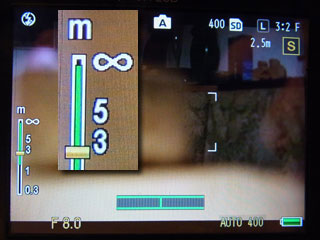
The simple solution that I mentioned is the DOF indicator that the GXR displays in the A and M exposure modes (GR: Av, TAv, M). Just turn the front wheel to set the aperture so that the green DOF bar touches (Figure 2) or nearly touches (Figure 1) infinity - that's it. You can do so in advance so that this step does not waste precious time.
 |
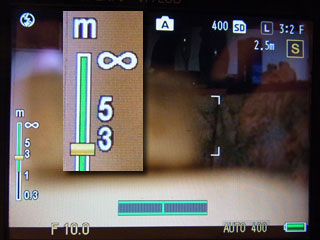 |
Figures 1-2: Snap focus set at 2.5 m. f/8 (left) is nearly hyperfocal, f/10 (right) is hyperfocal
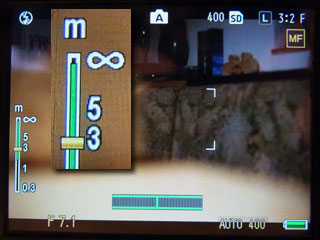
The same approach can also be used for manual focusing (see Figures 3-4). The advantage that you get here is that, in my opinion, changing aperture manually is much simpler than setting distance manually (you need not press the focus but while turning the up-down wheel).
 |
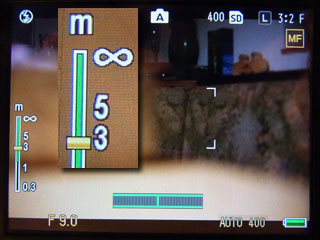 |
Figures 3-4: Manual focus set to about 3 m. f/7.1 (left) is nearly hyperfocal, f/9 (right) is hyperfocal
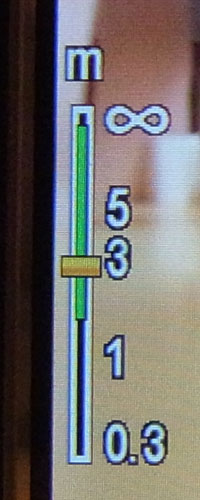
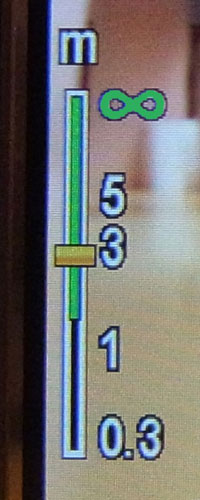
I would like to make one suggestion for improvement, though (inspired by Tom Caldwell's proposal): Change the color of the infinity symbol from white to green as soon as the far limit reaches infinity. Also change the color to yellow, orange, and finally red (or whatever color), when the far limit would be far beyond infinity, resulting in a too high near limit, that is, inefficient focusing (of course, you may want to have it that way...).
 |
 |
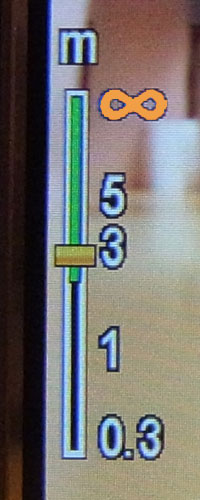 |
Figures 5-7: Using the infinity symbol as an indicator of hyperfocal distance. White = far limit of depth of field below infinity, green = hyperfocal distance (about), yellow > organge > red = far limit beyond to way beyond infinity
Full Press Snap
Full press snap allows users to press the shutter button in one motion when Multi AF or Spot AF is selected as focus mode and switches the mode to snap focus at a preselected distance. The default distance of 2.5 m is useful for street photography and many indoor situations. However, it is less useful for landscape shots. (See above for how you can set the snap focus distance)
Full press snap is enabled (ON) by default (indicated by an undocumented "FS" in the viewfinder/LCD screen), because it is intended as a means not to miss a shot due to slow autofocus. This functionality had been requested by Harold Glit and implemented by Ricoh according to his specification (as I was told by him), including enabling the function by default.
Full press snap can be disabled or enabled in the menu: Shooting > Full Press Snap (On/Off/Auto-Hi ISO, default: On; "Auto-Hi ISO", is like "On" and also sets ISO to "Auto-Hi"). When full press snap is activated, "FS" and the snap focus distance are displayed in the viewfinder/LCD screen.
Here is the description of the full press function taken from the GXR manual (adapted):
- Take photographs without pausing to focus the camera when Multi AF or Spot AF is selected for focus.
- If the function is ON the following happens: If the shutter-release
is pressed all the way down in one motion, the camera will take a picture
at the focus distance selected for Snap Focus Distance (which is 2.5 m by
default). Choose this function when quick shutter response is required.
Tip: Autofocus - The camera will focus normally if you press the shutter-release button halfway (page 69 in the English manual, adapted).
In my opinion, full press snap is an "expert function" that should not be enabled by default. I assume that some users are not be aware of this function, may not know what the symbol "FS" means, or may just overlook it. Therefore, they may be puzzled by the results that they get from time to time: unexpected fuzziness. They may not realize that full press snap took over, and it will be hard for them to find the real reason for the fuzziness. Probably, they will simply assume that Multi/Spot AF failed.
See my conclusions and suggestions to Ricoh regarding this function.
Others
Interval Shooting
Interval shooting allows you to shoot a series of photos at fixed time steps (1 sec, 2 sec, 5 sec, ... 55 sec, 1 min, ... 60 min) for a definite (1...99) or indefinite number of times (limited by memory space). I used this function only a few times with the GX100 long ago (cloud movie, star movie).
|
made by  on a mac! on a mac! |


| 19.11.2020 |