

Astronomy | GXR · GR · RX100 M1 · RX100 M4 · RX10 M3/4 · TZ202 · X Vario · M240 · General | Photos | Conf. Places | Calendars | Art
Ricoh GXR: FAQ - M-Mount Unit
Overview of Questions | Answers
Archive
On this page, I collect some questions regarding the Ricoh GXR and the M-mount expansion unit; the body, the other camera units, and more general questions are covered on a separate page. For the convenience of the readers, some questions may be redundant with items listed on my experience and characteristics pages.
See also: GXR M-Mount FAQ on Ricohforum
Overview of Questions
Settings
Lenses
- Which M-bayonet lenses can I use on the GXR M-mount unit?
- How can I check whether a lens can be used on the GXR M-mount unit?
- Can I use Leica R lenses on the GXR M-mount module?
- Do I need to "tell" the camera which lens I am using (if I am not interested in compensating for certain lens imperfections)?
Focusing
- How is manual focusing supported on the GXR?
- Is focus shift an issue with the GXR?
- Which is the correct depth of field scale for M-mount lenses (FF) on the GXR M-mount expansion unit (APS-C)?
- When reading distance/DOF marks on a manual lens meant to be used with a 35mm rangefinder, shouldn't we have to multiply all of those distance readings by the value of the GXR sensor crop factor, which in this case is x1.53 to be precise?
- How can I lock exposure? How can I lock focus? Or what?
Exposure, ISO, Modes
- How can I lock exposure? How can I lock focus? Or what?
- What happens when I set ISO to Auto/Auto High in M (manual) mode?
- Is the M-mount expansion unit able to measure exposure at maximum aperture automatically? There doesn't seem to be a mechanism that would allow this...
- Is there an aperture priority mode for the GXR (with EV compensation) and if so, how does it work? Can I see the shutter speed in the viewfinder/on the LCD display?
Display: Viewfinder, LCD
- Does the display automatically show the correct section as delivered by the lens used (I would expect this because the viewfinder image is created by "looking" through the lens...)? If yes, wouldn't this imply that I can also use a zoom lens?
- Does the VF-2 viewfinder show the same information as the LCD screen on the rear?
- What happens in the viewfinder/on the LCD screen when I change aperture manually for an M-mount lens? Will the viewfinder image become lighter/darker or does the camera try to keep brightness constant in aperture priority mode?
For more questions and information please also look at the following pages on the Ricohforum:
- Ricoh GXR M mount FAQ: ricohforum.com/phpbb/viewtopic.php?f=63&t=6850
- M mount lenses compatibility list: ricohforum.com/phpbb/viewtopic.php?f=63&t=6881
Answers
Settings
Which are the list of settings stored during the shutoff that we can recover from the body or the module?
I was asked, which are the list of settings stored during the shutoff that we can recover from the body or the module at our choice via the function "Start Settings Readout" in the "Setup" menu?
After several e-mails to and fro with Mr. Wutzke from Ricoh and two (or more) e-mails sent by him to Japan, the answer to this question is as follows:
- All settings that a user can change are either stored in the body or in the camera unit - depending on the setting in the menu "Start Settings Readout".
"Pure logic" led Mr. Wutzke and me to conclude that the settings are stored in the same way either in the body or in the camera unit. Finally, Mr. Wutzke confirmed that ALL the settings that a user can change are stored.
I am not completely convinced that this answer is correct, but at the moment, this is "THE" answer.
Lenses
Which M-bayonet lenses can I use on the GXR M-mount unit?
Ricoh publishes a list of approved lenses at the bottom of their M-mount unit page (Mounting Check Results for Each Lens). There is also a list of (in)compatible lenses at Ricohforum that is continually updated and much more useful than Ricoh's list. Among the manufacturers who offer Leica M lenses (but not all of them are compatible with the M-mount unit) are:
- Leitz (Leica) - current and old models
- Zeiss - current and old models
- Voigtländer (Cosina) - current and old models
- Ricoh - no longer manufactured
- Minolta - no longer manufactured
- Russian lenses: Zorki, Industar, ... (M39 only)
Last, but not least, you can search the Ricohforum or the Ricoh forum at dpreview for (in)compatible M-mount lenses or, even better, ask the forum members whether the lens that you consider to use is compatible with the M-mount unit.
Also note that a multitude of manual lenses can be fit to the GXR M-mount unit using adapters (Novoflex, Chinese, others...).
How can I check whether a lens can be used on the GXR M-mount unit?
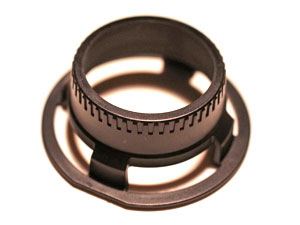
If there is no other information, you can use the "check device" that Ricoh supplies with the M-mount unit. You can use it to check whether the rear part of a lens protrudes too far so that it might damage the sensor.
 |
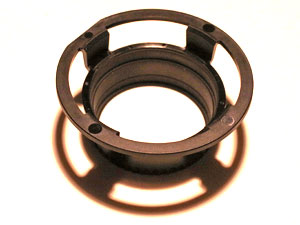 |
Photos: The check device that Ricoh supplies with the M-mount expansion unit
Can I use Leica R lenses on the GXR M-mount expansion unit?
I was asked this question by nicolabotta. In advised him to also post this questions at Ricohforum and the Ricoh forum at dpreview.com. Several dpreview forum members confirmed that it is possible to use Leica R lenses at the GXR with an adapter. Here is the respective thread at dpreview, and here is my own reply:
I did a Web search and found this page: nemeng.com/leica/017e.shtml (Leica R & M lens mount adapters ?)
It says that you can use Leica R lenses at an M-mount Leica (or any other M-mount camera), not vice versa. They recommend this only for wide angle and fisheye lenses, because there is no focus coupling. But this argument is not valid for the GXR because it is not a rangefinder camera - you focus using the EVF or LCD screen (and focus assist plus magnification).
However, I assume that the R-mount lenses are a little bit large and heavy for the small GXR (I have no idea…). You can find an R-to-M adapter (LEM/LER) on the Novoflex Website (www.novoflex.com/index.php).
Do I need to "tell" the camera which lens I am using (if I am not interested in compensating for certain lens imperfections)?
No, you don't have to if you are content with what the lens achieves without any compensation of, for example, vignetting or chromatic aberration - and if you can live with the fact that the Exif data won't tell you anything about the lens. I never used this feature and actually, I am too lazy to always change the settings when changing lenses (which I also do not like very much...).
Focusing
How is manual focusing supported on the GXR?
The GXR M-Mount unit offers only one method for focusing manually: The user sets the focus manually by turning the focus ring of the (manual) lens.
Manual focusing is furthermore supported in several ways:
- Depth of field scale: You can use the depth of field scale on the lens if there is one.
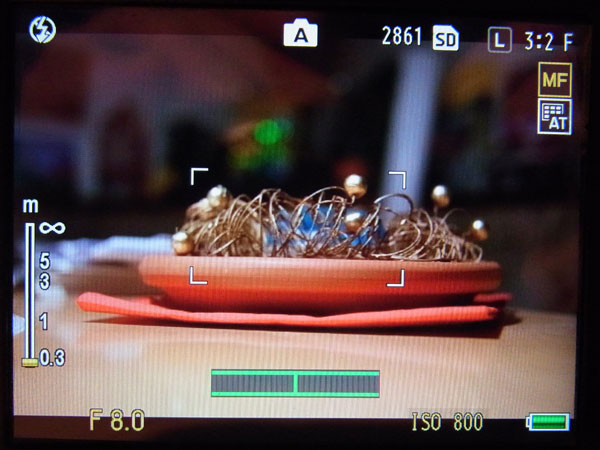
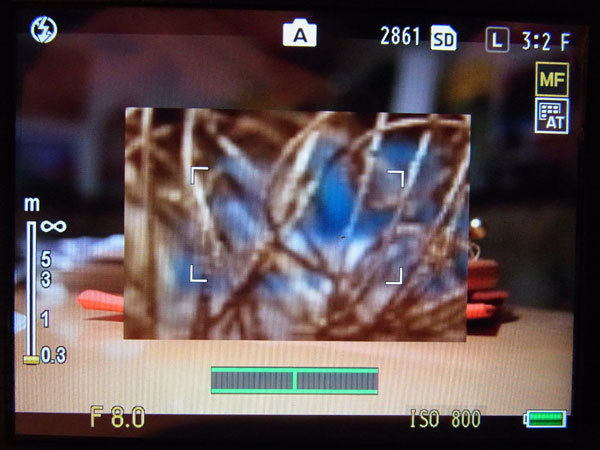
- Enlargement: A section of the picture can be enlarged 2x, 4x, or 8x. Either, a section of the display shows the enlarged section ("Enlarge Part", lower quality), or the enlarged section is shown full screen ("Enlarge All", better quality). The enlarged section can be moved in either mode.
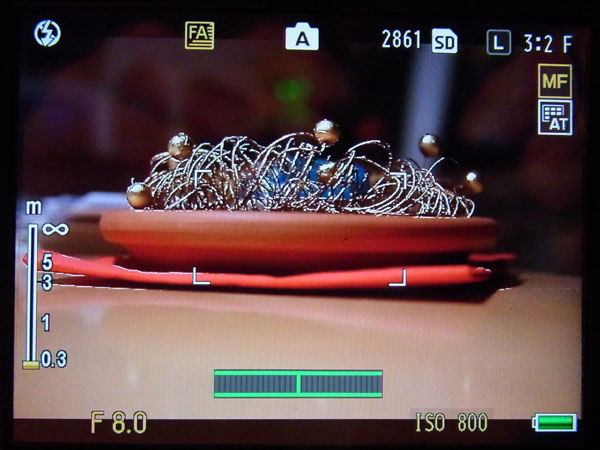
- Focus assist (two methods): The GXR offers two methods for supporting manual focusing: Mode 1 creates "sparkling" edges in a colored image, mode 2 emphasizes edges in a B&W image (highpass filter).
Most users prefer mode 2, whereas I prefer mode 1 or no focus assist at all, only full screen magnification.
Enlargement was considerably improved and focus assist introduced with firmware update 1.40 that accompanied the introduction of the M-mount expansion unit.
 |
 |
 |
Photos: No magnification (left), "Enlarge Part" (center), and "Enlarge All" (right); in the latter case, a small display indicates where the enlargement is located in the image
 |
 |
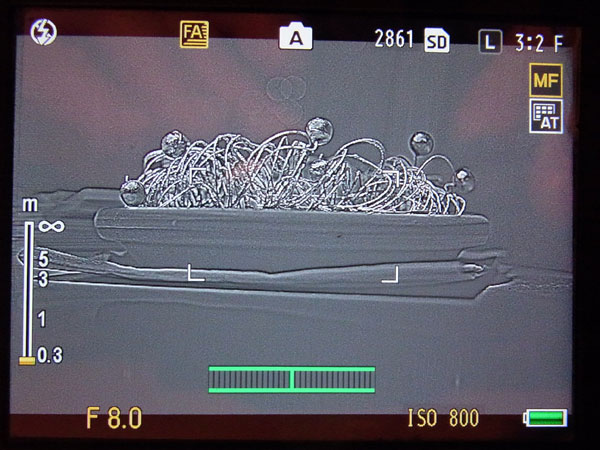 |
Photos: No focus assist (left, focus assist mode 1 (center) and mode 2 (right)
Is focus shift an issue with the GXR?
Many rangefinder lenses have focus shift, which means that the focus shifts (or moves) to a slightly difference distance when you change the f-stop. Particularly, the Zeiss Sonnar 50mm f/1.5/ lens has been blamed for having noticeable focus shift - which Zeiss countered with a technical note.
Therefore some GXR users (and forum posters) are anxious whether this will be a problem or not. I will cite the answer provided by Godfrey in the Ricoh forum at dpreview:
- Focus shift means that the focus point shifts as the aperture changes. This can be a problem on rangefinder cameras (and SLRs with auto-diaphragm operation). A lens which focus shifts is a problem to work with on a range finder camera because the rangefinder mechanism has no way of knowing where the correct focus point is if it changes as the lens is opened up or stopped down. The same is true on an auto-diaphragm SLR lens which focus shifts ... the focusing system or your eye sets a sharp point, at the moment of exposure the lens stops down and the focus point has shifted.
- With the GXR-M (and other mirrorless interchangeable lens cameras) you normally look through the lens set to the taking aperture. Because of this, whether the lens focus shifts or not is not relevant to your focusing operation ... you're always going to be making the image sharp no matter what, and the aperture isn't going to change. It's only if you open the lens up to focus and then close it down to make the exposure that focus shift can throw your focus setting off.
Someone else (regrettably, I forgot who) added that you should no longer change the aperture after focusing. It is also a problem to open the aperture after focusing because you may leave the "sharp zone" if the focus was not "spot on" (I find it harder to focus exactly then the lens is stopped down).
Which is the correct depth of field scale for M-mount lenses (FF) on the GXR M-mount expansion unit (APS-C)?
In July 2013, a poster at the dpreview Ricoh forum asked: I was wondering how the crop factor on the GXR M Mount affects the depth of field scales on lenses used with that mount. I understand that the aperture is not affected by the crop factor but that depth of field is. Can anyone explain this in a clear and cogent way?
Or in plain text, one might ask: Which depth of field (DOF) scale is relevant, when I use an M-mount lens, which was designed for 35mm film cameras, when I use it with my GXR M-mount expansion unit, which has an APS-C-size sensor (crop factor 1.5)?
After a lot of quarrelling between two forum members (an "interesting" read in itself...), the final - and hopefully agreed on - answer turned out as follows:
- Given a particular full-frame lens, if you use the DOF scale marking for a focus zone on the base of a certain aperture, set the lens's aperture to the next smaller opening. For example, if you use the f/8 markings, set the f-stop to f/11 instead of f/8). (Adapted from the forum posting)
Note: The exact factor is given by the crop factor, that is 1.5 stops for the GXR M-mount expansion unit. But one stop is close enough given the resolution of the DOF scale markings. (Adapted from the forum posting)
I came across this issue myself in spring 2013. I had relied on the lenses DOF scales and found out that some photos were fuzzy although I had expected everything to be within DOF. Now I understand why this can be the case...
Note: See also the DOFMaster Website (online version) for calculating the DOF of lenses
When reading distance/DOF marks on a manual lens meant to be used with a 35mm rangerfinder, shouldn't we have to multiply all of those distance readings by the value of the GXR sensor crop factor, which in this case is x1.5 to be precise?
The simple answer is NO. When you set a distance of the rangefinder/full-frame lens' focus ring, it is correct for an APS-C body/camera. I have verified this once again with a lens with shallow depth of field (Zeiss Sonnar 50mm f/1.5). But if this were not the case, I would already have had zillions of unusable photos... Of course, there is a caveat: The depth of field (DOF) is shallower than indicated by the markers on the distance scale. As a rule of thumb, use the aperture markers of an aperture one stop more open to get the correct depth of field information (the exact factor is 1.5 f-stops). See here for more information about depth of field when using full frame rangefinder lenses on an APS-C body.
How can I lock exposure? How can I lock focus? Or what?
See below
Exposure
How can I lock exposure? How can I lock focus? Or what?
Lock Exposure
For locking exposure alone, you can use the "AE Lock" (automatic exposure lock) function. You can use it only if you assign it to one of the two function buttons Fn1 or Fn2.
Lock Focus
There is no need for a "lock focus" function for manual lenses. In a sense, focus is always locked for these lenses, which has its advantages. Thus, pressing the shutter-release button down halfway, simply locks exposure. Then reframe the picture and press the shutter-release button completely to take the picture.
Afterword
Actually, there is a shortage of function buttons on the GXR body since the recent firmware updates. In my case, the following functions compete for function buttons: (1) AE Lock, (2) Focus assist, (3) Magnification (Enlarge Part or Enlarge All). And there are many more functions to choose from, like JPEG>RAW, for example.
What happens when I set ISO to Auto/Auto-Hi in M (manual) mode?
On the Ricoh GXR, you can set ISO to Auto or Auto-Hi when the camera is in M (manual) mode. One might argue that this does make not much sense, because you do not want the camera to change exposure in manual mode by changing the ISO value automatically... Probably, Ricoh thinks so, too (except for the A16 camera unit). Actually, the GXR sets ISO to a fixed value when ISO is set to Auto/Auto-Hi. The value differs between camera units and should be documented in the respective manual. For the A12 M-mount expansion unit, ISO is set to 200. See the GXR FAQ for the other camera units.
Is the M-mount expansion unit able to measure exposure at maximum aperture automatically? There doesn't seem to be a mechanism that would allow this...
Since there is no mechanical or electronic coupling between M-mount lenses and the M-mount expansion unit (it does not use Leica coding), the camera cannot measure expose at maximum aperture automatically. The only reason that comes to my mind to use maximum aperture is that you get lower depth of field, which may allow for easier and more correct focusing. But please be aware of the fact that some rangefinder lenses suffer from focus shift, which essentially means that the focus that you set with aperture wide open might no longer be correct when the lens is stopped down (my Zeiss 1.5/50mm is "(in)famous" for focus shift).
Is there an aperture priority mode for the GXR (with EV compensation) and if so, how does it work? Can I see the shutter speed in the viewfinder/on the LCD display?
Yes, just turn the mode dial to the "A" position (see Figure below):
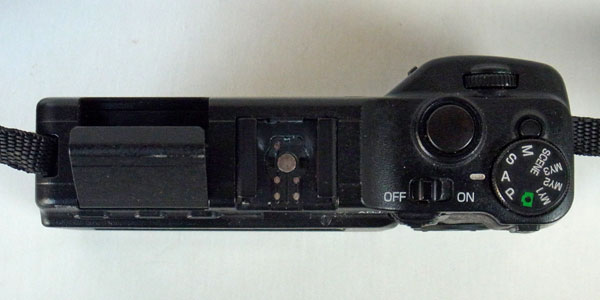
Figure: Mode dial on the Ricoh GXR body
With the A12 M-mount expansion unit, the "P" mode also works like the "A" mode. Thus, you even need not change the dial position if you used another camera unit before the A12 unit.
Exposure compensation can be activated in several ways on the Ricoh GXR: (1) assign the function to one of the four positions in the "Adjust" menu, (2) assign it the the +/- buttons on the directional pad on the camera back, or (3) assign it to the zoom lever, which is not used by the A12 M-mount expansion unit. I use only the second option to have one more position available in the "Adjust" menu. Having it on the zoom buttons often led to inadvertent changes...
When you compensate exposure, the GXR attempts to simulate the effect in the viewfinder/on the LCD display. That is, the image in the viewfinder/on the LCD display gets lighter or darker than the normal image. The camera attempts to maintain this as long as the viewfinder/LCD display image doesn't not get too dark.
Shutter speed is displayed after you half-pressed the shutter release button (which also locks exposure and distance). In "M" mode, the shutter speed is displayed permanently. Of course, aperture is not displayed in "M" mode because the camera does not "know" it.
Display: Viewfinder, LCD
Does the display automatically show the correct section as delivered by the lens used (I would expect this because the viewfinder image is created by "looking" through the lens...)? If yes, wouldn't this imply that I can also use a zoom lens?
Yes, it does - just like a (D)SLR, but actually more precise, because a 100% section is shown. This is true for both the LCD screen and the electronic viewfinder VF-2.
Using a zoom lens with the M-mount expansion unit is, of course, possible, but I do not know of M-mount zoom lenses that might be used. However, it should be possible to use older zoom lenses where you can set aperture, distance, and focal length manually with an adapter (for example, an M42 to M-mount adapter).
Does the VF-2 viewfinder show the same information as the LCD screen on the rear?
Yes, it does. Both show 100% of the image, and both have the same resolution (about 900k pixels).
What happens in the viewfinder/on the LCD screen when I change aperture manually for an M-mount lens? Will the viewfinder image become lighter/darker or does the camera try to keep brightness constant in aperture priority mode?
Admittedly, how the GXR controls viewfinder brightness still remains Ricoh's secret. Two mechanisms might be used: (1) adjusting gain, (2) changing aperture automatically depending on the brightness. The latter is only possible for automatic lenses, and I could verify it under certain lighting conditions. For the M-mount expansion unit, the camera itself can control viewfinder brightness only by adjusting gain.
I experimented a little bit with the M-mount expansion unit to find out what happens. Here are my conclusions, which seems to be valid for the aperture priority as well as the manual mode:
- When there is sufficient light, the camera attempts to maintain a constant viewfinder brightness by adjusting gain, which you can easily verify for yourself. If you, for example, select a larger aperture (with a smaller f-stop value...) the viewfinder image lightens up for a short moment, but after about a second it returns to the original brightness (as much as possible...). This also happens if you compensate exposure (EV+/-) - at least within certain limits.
- At a certain "darkness", however, the camera no longer attempts (or is able) to maintain constant viewfinder brightness. Now, when you close aperture the viewfinder image gets darker and darker. The same applies to using exposure compensation. The camera is now no longer able to simulate its effect correctly, and the viewfinder images just gets darker and darker.
|
made by  on a mac! on a mac! |


| 19.11.2020 |